
 Hugames Minesweeper
Minesweeper online: rules and tips
Minesweeper is a game whose goal is to uncover all the empty squares of a grid without ever detonating the hidden mines. To do this, you have to progress step by step using logical deductions.
Basic controls and interface

The game is controlled very simply with the mouse:
 Left-click reveals the content of a free square.
 Right-click is used to mark a suspicious square by placing a flag on it.
The counter
 at the top left shows you the number of mines you still have to find.
How to read the numbers?
When a square is opened, it may reveal a colored number from 1 to 8. This number is the most important clue in the game: it tells you exactly the number of mines located in the directly neighboring squares, above, below, to the left, to the right, or diagonally.


etc.
A practical example of logical deduction
 Thanks to the clues given by the numbers, you can free up other squares.
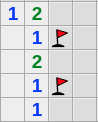
In this example, the "1" in the bottom right lets you deduce with certainty that there is a mine on the only square around it: this is where you have to place a flag.
 Once this flag is placed, you can deduce that there are no mines in the marked spots, since the "1"s located next to them already have a mine on the squares around them.
You can therefore left-click (normal click) on these two squares.
Expert Level: learning to cross-reference the numbers
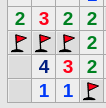
 In denser grids, looking at a single isolated number is not always enough.
To get unstuck, the trick is to look at two or three neighboring numbers
at the same time. By combining their clues, you'll manage to find a certainty:
either the exact location of a mine, or a completely safe square to open.
In denser grids, looking at a single isolated number is not always enough.
To get unstuck, the trick is to look at two or three neighboring numbers
at the same time. By combining their clues, you'll manage to find a certainty:
either the exact location of a mine, or a completely safe square to open.
What to do when facing chance (the 50/50 situations)?
 Sometimes, logic isn't enough and Minesweeper forces a completely random choice.
This happens when two squares have exactly the same chance of containing
a mine and no number can help you decide between them.
Sometimes, logic isn't enough and Minesweeper forces a completely random choice.
This happens when two squares have exactly the same chance of containing
a mine and no number can help you decide between them.
A piece of advice: don't leave this situation for the end of the game! If you have to click at random, and there's no other solution, you might as well do it right away. This will save you from spending ten minutes solving the rest of the grid only to lose everything on the very last click.
About no-guess mode:
On some grids and for players who want a challenge purely based on logic, there is a no-guess mode.
When this mode is enabled, all offered grids are designed to be solved entirely through reasoning, without needing to try a move at random.
- To play in no-guess mode: Open the All levels page and choose a level in the “No-guess mode” section.
- What does this change? You can be certain that each grid can be solved without guessing and without encountering an unavoidable 50/50 situation.
- Who is it for? Ideal for improving logical deductions and for those who don't like losing due to bad luck.
Continuing after a mistake
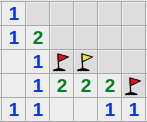 In this version of Minesweeper, you have the option to continue a lost game.
Click the "Continue game" button
that appears after a mistake: the mine you clicked on and that made you lose the game
is replaced by a yellow flag
In this version of Minesweeper, you have the option to continue a lost game.
Click the "Continue game" button
that appears after a mistake: the mine you clicked on and that made you lose the game
is replaced by a yellow flag
 and you can resume playing.
There is a limit to the number of times this is allowed in a single game,
which varies depending on the level.
In your best scores, scores with and without the option to continue after a mistake
are recorded separately.
Gameplay tip: the quick click on a number
To save time, there is a very handy feature: if you have already placed the correct number of flags around a number, you can click directly on that number. This will automatically open all the other adjacent squares without a flag, saving you from making several individual clicks.
Play Minesweeper Online :